DrupalClaw grew out of a problem its creator, Paulo Maia Carvalho, says code suggestions didn't solve: his team could spend almost two hours getting a Drupal environment running before writing any actual code. Composer, Drush, Docker, local settings, and installation work were part of the bottleneck. DrupalClaw moves AI assistance into that surrounding workflow, where an agent can carry out repetitive Drupal operations rather than stop at suggesting PHP.
Giving an agent the ability to act inside a project also changes where developer judgment is required. Paulo treats repetitive operations differently from generated custom code, configuration changes, database writes involving real content, production credentials, security settings, and changes to external systems. A failure in his own testing made that boundary concrete: valid PHP and a module that installed without errors still produced the wrong result because the generated hook did not match the Drupal version used by the project.
The interview, conducted by The DropTimes sub-editor Kazima Abbas, examines how DrupalClaw chooses safe defaults, adapts to existing projects, handles external actions, and defines the role of human review. Paulo has also outlined the rationale and architecture behind DrupalClaw in his launch article.
From Code Suggestions to Drupal Workflows
TDT [1]: What Drupal workflow problem made you decide that code suggestions alone were not enough?
Paulo Maia Carvalho: I was seeing my team spend almost two hours just getting the Drupal environment running before they could write any actual code. Composer, Drush, Docker, local settings, installation issues. At the same time, an AI assistant was suggesting PHP code, but that wasn't really the problem we needed to solve.
That made it quite clear to me that code suggestions only cover part of the Drupal development process. Before you can write code, you often need to set up the project, configure the environment, install Drupal and get all the services working properly.
So the real opportunity wasn't just helping developers write code faster. It was helping them get through the whole workflow, including the repetitive setup and configuration work around the code.
TDT [2]: Which DrupalClaw tasks are safe to delegate today, and where should developers still require manual review?
Paulo Maia Carvalho: For me, the safer things to delegate are the repetitive tasks: rebuilding caches, checking logs, installing modules with Composer, importing or exporting a database, running status checks, or scaffolding the basic structure of a module.
I’d still want a developer to review any generated custom code, configuration changes before they’re committed, and anything that writes to a database with real content.
And when it comes to production credentials, security settings, or code that can affect other modules, I wouldn’t delegate that without a proper manual review.
I see the agent more as a developer that can do a lot of the repetitive work very quickly, but you still need someone who understands the project and its context to make the final call.
Paulo Carvalho
Paulo Carvalho
I see the agent more as a developer that can do a lot of the repetitive work very quickly, but you still need someone who understands the project and its context to make the final call.
Paulo Maia Carvalho, creator of DrupalClaw
TDT [3]: What should newcomers understand about how Composer, Drush, Docker, and Drupal project structure fit together after using Learning mode?
Paulo Maia Carvalho: What I want a newcomer to understand is how the different tools work together.
A generic AI might tell you to run drush cr, but it doesn’t always give you the full context around that command. Is the container running? Is the local configuration in place? What exactly are you clearing and why?
With DrupalClaw’s Learning mode, you can see the commands the agent is actually running on your project and in what order. So instead of learning Composer, Drush and Docker as separate things, you start to understand how they fit together in a real Drupal workflow.
The idea is not to hide the complexity. It’s to make it easier to understand by seeing it happen in a real project.
Choosing Defaults and Working with Project Context
TDT [4]: When DrupalClaw encodes a task as a SKILL.md workflow, how do you decide which implementation path becomes the default?
Paulo Maia Carvalho: I normally start with the Drupal documentation and core conventions. If there’s a well-established Drupal way of doing something, that should be the default rather than my personal preference or simply the quickest option.
I also try to choose defaults that are safe and easy to recover from. For example, before a database import, the skill can create an export first. That’s not because we expect something to go wrong, it’s just a good habit to build into the workflow.
And when there isn’t one clear Drupal standard, I’d rather give the developer a choice than make that decision for them.
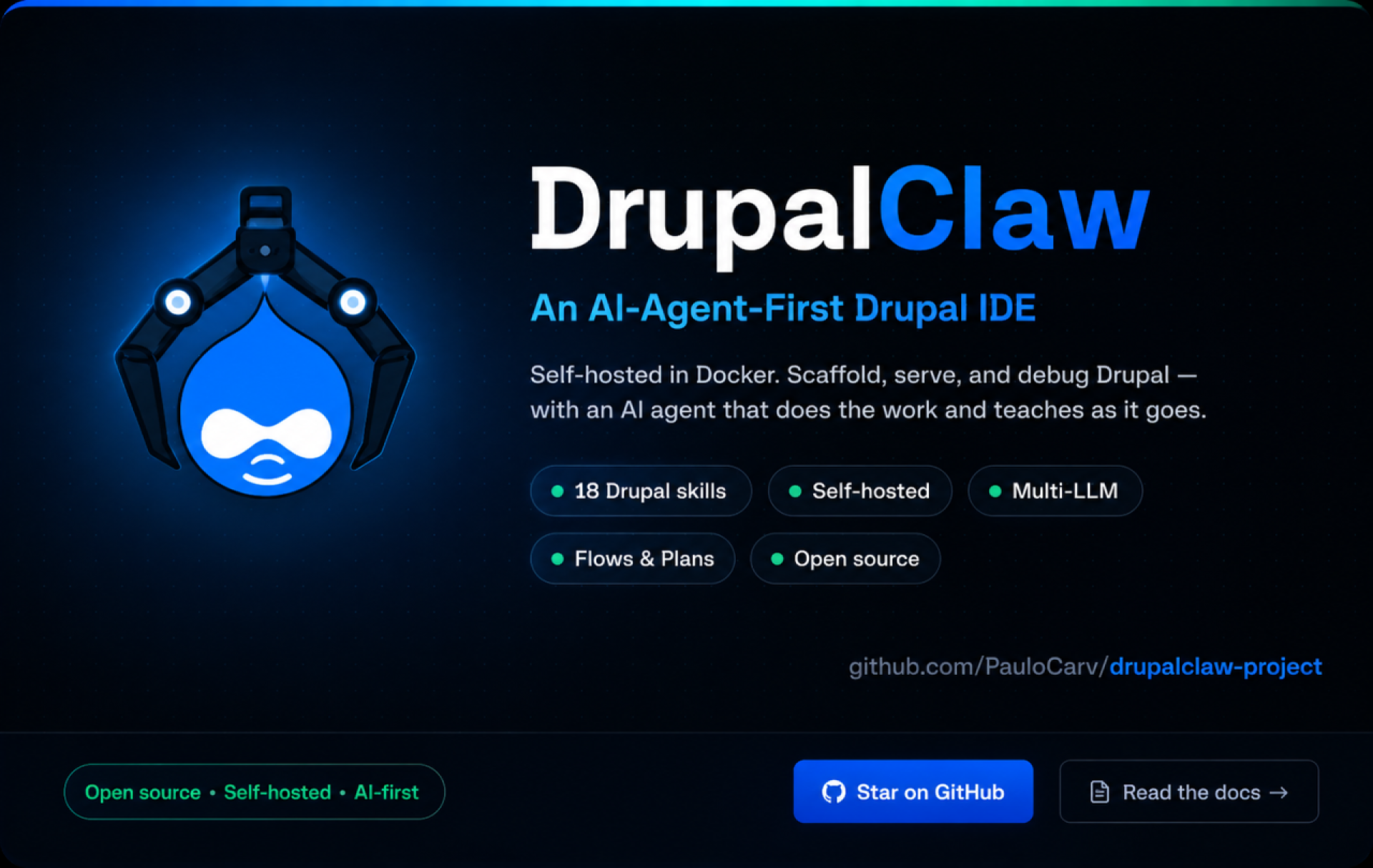
DrupalClaw presents itself as a self-hosted, agent-first Drupal development environment with Drupal-specific skills, multiple model providers, and reusable Flows and Plans.
TDT [5]: How does a prescribed skill adapt to a project’s existing structure and standards without departing from its fixed workflow?
Paulo Maia Carvalho: The main steps in a skill are fixed. The agent checks the prerequisites, runs the steps in the right order and validates the result.
Where it can adapt is based on what it finds in the project. If settings.local.php already exists, it won’t overwrite it. If a contrib module is already installed, it can skip that step. And if the project has its own coding standards, drupal-analyze can use those instead of the defaults.
So the skill defines what needs to happen, but the agent can adjust how it gets there based on the project it’s working with.
TDT [6]: When several approaches are technically valid, what should DrupalClaw prioritise when choosing between them?
Paulo Maia Carvalho: I’d normally look at safety first, then Drupal conventions, and then the way the project is already structured.
If there are two valid approaches, I’d prefer the one that is easier to recover from if something goes wrong. I’d also try to stay consistent with the existing project rather than introduce a different pattern without a good reason.
Teams can also define their own rules. If a project has standardised on a specific module or approach, the agent should follow that consistently.
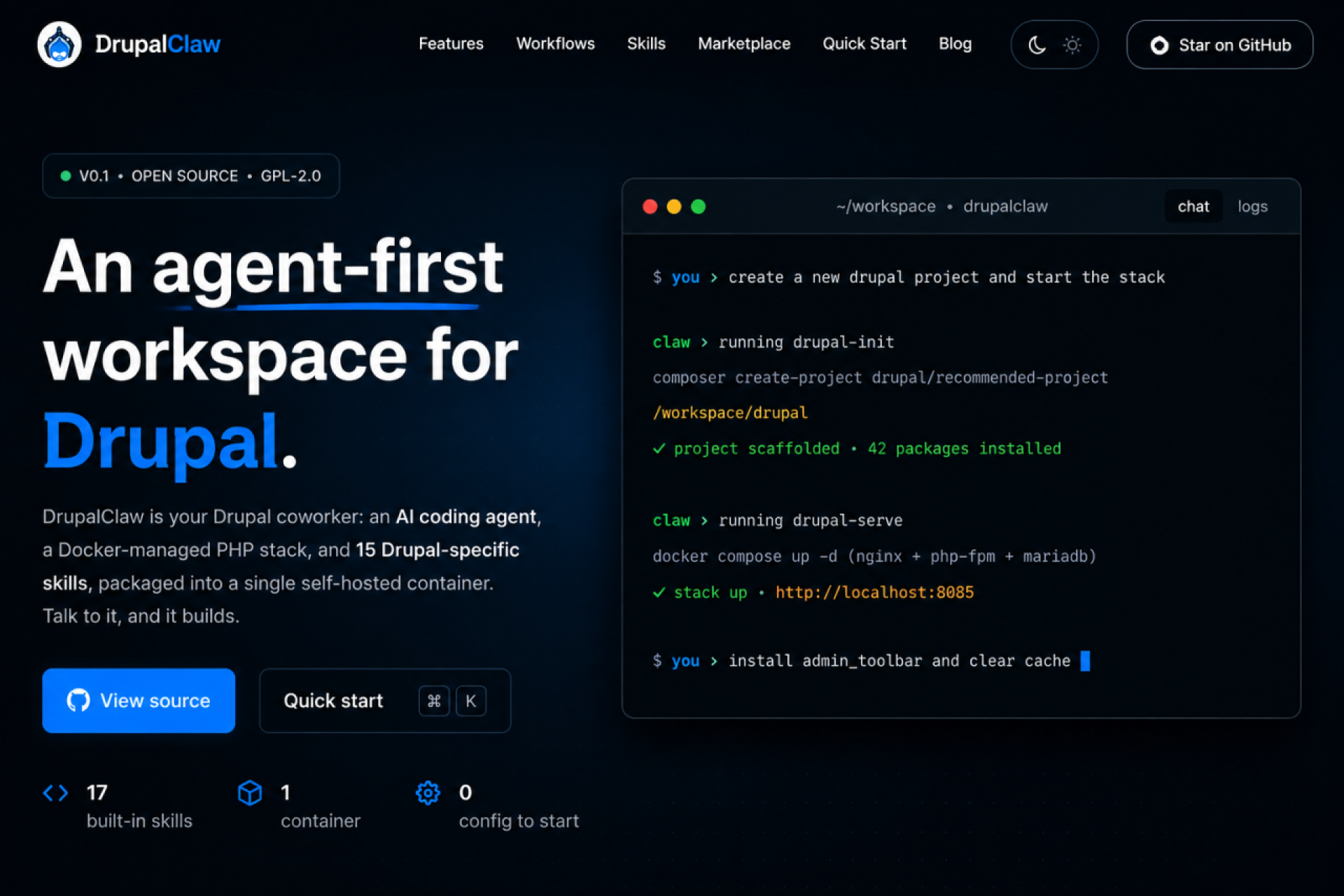
DrupalClaw’s workspace presents Drupal project setup and development operations through a chat-driven agent alongside the project environment.
Architecture, Providers, and External Permissions
TDT [7]: What did building DrupalClaw on PiClaw make easier, and where did that decision limit your control?
Paulo Maia Carvalho: Building on PiClaw made a lot of things easier because I didn’t have to build the core infrastructure from scratch. Things like streaming chat, terminal sessions, session management and the encrypted keychain were already there. That saved me a lot of work.
PiClaw is a solid project and @rcarmo deserves full credit for that.
The harder part is that DrupalClaw has to work within the existing PiClaw backend and API. If there’s a limitation there, I usually have to handle it on the DrupalClaw side.
I ran into a few examples of that early on, like command session state causing 409 conflicts and some timing issues with Adaptive Card actions. I could work around them, but mostly from the frontend rather than fixing the underlying behaviour.
I believe that’s the trade-off, I get a strong foundation to build on, but I also have to work within its boundaries.
TDT [8]: How should teams choose among DrupalClaw’s supported large language model (LLM) providers when working on client projects?
Paulo Maia Carvalho: I think it depends a lot on what the team already uses and what matters most for that project.
If a team already has GitHub Copilot licences and the right enterprise setup, that can be the easiest place to start because there’s less to configure and no need to introduce another provider.
For more complex tasks, like architecture decisions or difficult debugging, I’ve had better results with Anthropic models in my own testing. They can be more expensive, so it becomes a question of whether the better result saves enough time to justify the difference.
Privacy is another important factor. DrupalClaw uses the provider configured by the developer, so teams still need to understand that provider’s data handling and retention policies, especially when working with sensitive client code.
So I wouldn’t say there’s one best provider. I’d look at the team’s existing setup, the type of work, cost, response time and the privacy requirements of the project.
TDT [9]: What approval boundaries should govern Model Context Protocol (MCP) actions that can modify repositories or project-management systems?
Paulo Maia Carvalho: The MCP connection is already there, but the permissions and approval flow are still something I’m refining.
My view today is that read-only actions, like checking a GitHub issue or looking up a Jira ticket, can happen without much friction. But anything that changes something, like opening a PR, closing a ticket or pushing a commit, should require explicit approval from the developer.
DrupalClaw also keeps the chat history, so there is a basic record of what the agent did and why. But for shared repositories and project-management systems, I would still rely on the controls teams already use, like branch protection and PR reviews.
The agent should work within those existing processes, not replace them.
TDT [10]: How do Flows and Plans make AI-assisted Drupal work easier to review and repeat?
Paulo Maia Carvalho: Plans help because the developer can see what the agent intends to do before it starts. You can review the steps, approve them, and then follow what was actually executed.
Flows are more about repeatability. If a sequence worked well for one Drupal project, you can reuse that same process on the next one instead of starting again from scratch.
For a team, I see Plans as a way to make actions easier to review, and Flows as a way to make successful processes more consistent.
They don’t replace code review or the team’s existing controls. They just make it easier to understand what the agent did and to repeat the same workflow later.
Failure, Existing Projects, and Community Trust
TDT [11]: What failure in your own testing most changed how you think about agent-first Drupal development?
Paulo Maia Carvalho: One failure that stayed with me was when the agent generated a custom module with a hook that looked completely valid, but was wrong for the Drupal version used by the project.
The PHP was fine, the module installed without errors, but the hook simply didn’t run. The API had changed between Drupal versions, and the agent hadn’t taken that into account.
That changed how I think about skills. It’s not enough to know how to perform a task. The agent also needs to understand the version and context of the project it’s working on.
Since then, skill drupal-status reports the exact Drupal version upfront, and I’m adding those checks to the scaffolding skills as well. I also started treating static analysis with drupal-analyze as a normal step after generating code, rather than something optional.
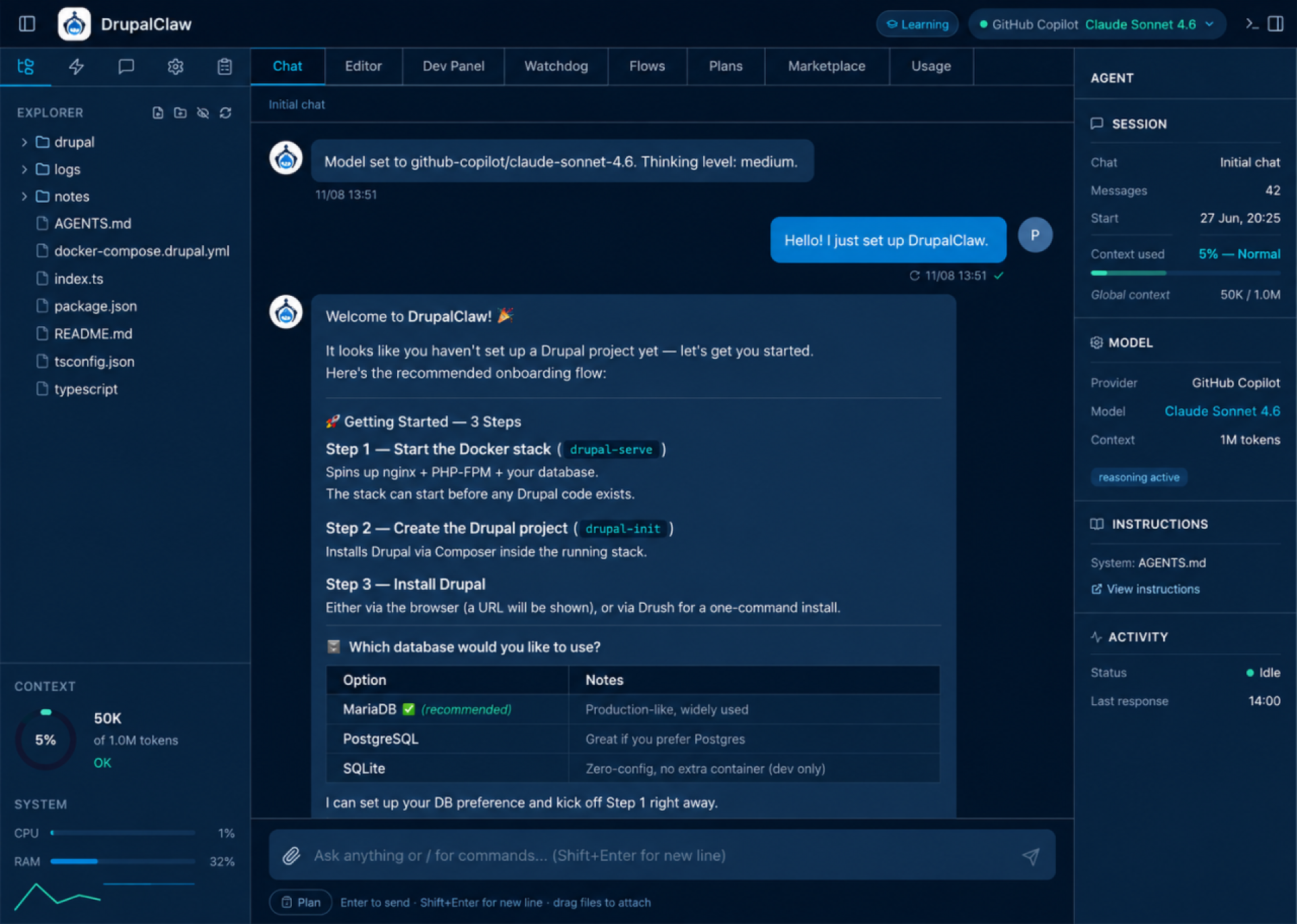
DrupalClaw guides project setup inside the workspace while exposing the surrounding development context, including files, model details, session state, and the commands used to start the Drupal environment.
TDT [12]: How does DrupalClaw handle an inherited, heavily customised codebase compared with a clean project?
Paulo Maia Carvalho: It handles an existing codebase reasonably well, but obviously the messier the project is, the more context the agent needs.
One thing I’m testing with the skill drupal-index is building a better picture of the project structure and the relationships between modules. That means the agent doesn’t have to inspect the codebase file by file every time, which helps a lot with inherited projects.
The harder part is when a project has conventions that were never documented. Maybe there’s a specific way the team structures configuration, or an important deployment detail hidden in a Makefile. The agent can only work with the context it has.
So with an existing project, I normally start by understanding the current state first, using things like drupal-status, drupal-debug and drupal-index, before asking the agent to make changes.
TDT [13]: What should the Drupal community contribute first to make DrupalClaw more useful and trustworthy?
Paulo Maia Carvalho: I’d say skills first, and then security review.
Skills are where the community can add a lot of value, because Drupal has so many different workflows, modules, hosting setups and project conventions. The more of that knowledge we can capture, the more useful DrupalClaw becomes.
Security review is equally important. If an agent is going to run commands and interact with real projects, people need to understand exactly what it can do and where the risks are.
I’d like that trust to come from people reviewing and challenging the project, not just from me saying it’s safe.
I’d like that trust to come from people reviewing and challenging the project, not just from me saying it’s safe.
Paulo Maia Carvalho, creator of DrupalClaw
TDT [14]: What would meaningful adoption look like a year from now?
Paulo Maia Carvalho: For me, meaningful adoption would be seeing an agency use DrupalClaw on real client projects and then contribute a skill back.
That would tell me much more than download numbers or GitHub stars. It means someone used it in practice, found something missing, and decided to improve it for others.
If, a year from now, there are community-contributed skills covering workflows I hadn’t thought about myself, I’d consider that a very good sign that DrupalClaw is becoming useful beyond my own projects.
Image Attribution Disclaimer: At The Drop Times (TDT), we are committed to properly crediting photographers whose images appear in our content. Many of the images we use come from event organizers, interviewees, or publicly shared galleries under CC BY-SA licenses. However, some images may come from personal collections where metadata is lost, making proper attribution challenging.
Our purpose in using these images is to highlight Drupal, its events, and its contributors—not for commercial gain. If you recognize an image on our platform that is uncredited or incorrectly attributed, we encourage you to reach out to us at #thedroptimes channel on Drupal Slack.
We value the work of visual storytellers and appreciate your help in ensuring fair attribution. Thank you for supporting open-source collaboration!
Disclaimer: The information provided about the interviewee has been gathered from publicly available resources. The responsibility for the responses shared in the interview solely rests with the featured individual.
Note: The vision of this web portal is to help promote news and stories around the Drupal community and promote and celebrate the people and organizations in the community. We strive to create and distribute our content based on these content policy. If you see any omission/variation on this please reach out to us at #thedroptimes channel on Drupal Slack and we will try to address the issue as best we can.







 Kazima AbbasKazima Abbas is a sub-editor at The Drop Times