



Bento Showcase Brings Visual Hierarchy to Drupal Views

Site builders can now use the first stable release of Bento Showcase, published on 28 September 2026 as a Drupal Views style for mixed-size content layouts. Version 1.0.0 supports Drupal 11.2 or later and marks the module's public API as stable across the 1.x series. The project is also now covered by Drupal's security advisory policy.
The module matters because it leaves content selection and ordering inside Views while using tile size and placement to express visual hierarchy. One result can occupy a dominant hero position while others become wide, tall, or smaller supporting cards, without requiring editors to compose each item separately. That gives a query-driven collection the potential to provide much more of a page's visual structure than a conventional equal-card grid.
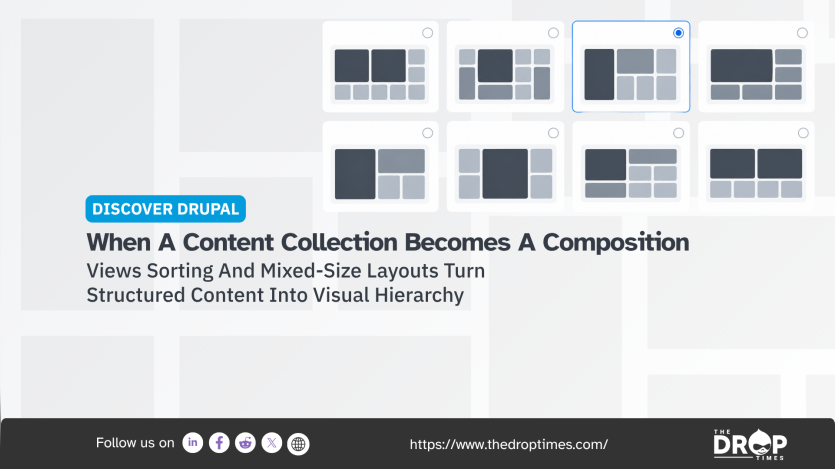
The supplied layouts include Adaptive, Editorial Mosaic, Editorial Compact, Magazine Spread, Product Showcase, Product with Feature Card, Centered Product, Product Extended, Spotlight, and Two Heroes. They hold between four and nine items and establish different relationships between lead and supporting content. Adaptive can choose an arrangement according to the number of results and the shapes of their images, while the fixed layouts provide repeatable compositions for particular presentation patterns.
Mixed-size cards also create an image problem. A square tile, wide card, tall card, and large hero do not ask the same proportions from a source image, yet CMS media rarely arrives prepared for every possible position. Bento Showcase therefore associates separate Drupal image styles with its 1×1, 2×1, 1×2, and 2×2 tile shapes.
The shipped styles use Image Scale and Fill Background, which keeps the complete source image visible and fills unused space from a blurred copy. Site builders can replace those defaults with Scale and Crop, Focal Point, or another image style when a different treatment is appropriate. The choice is particularly relevant for report covers, screenshots, logos, posters, illustrations, and images containing text, where an automatic crop can remove meaningful information.
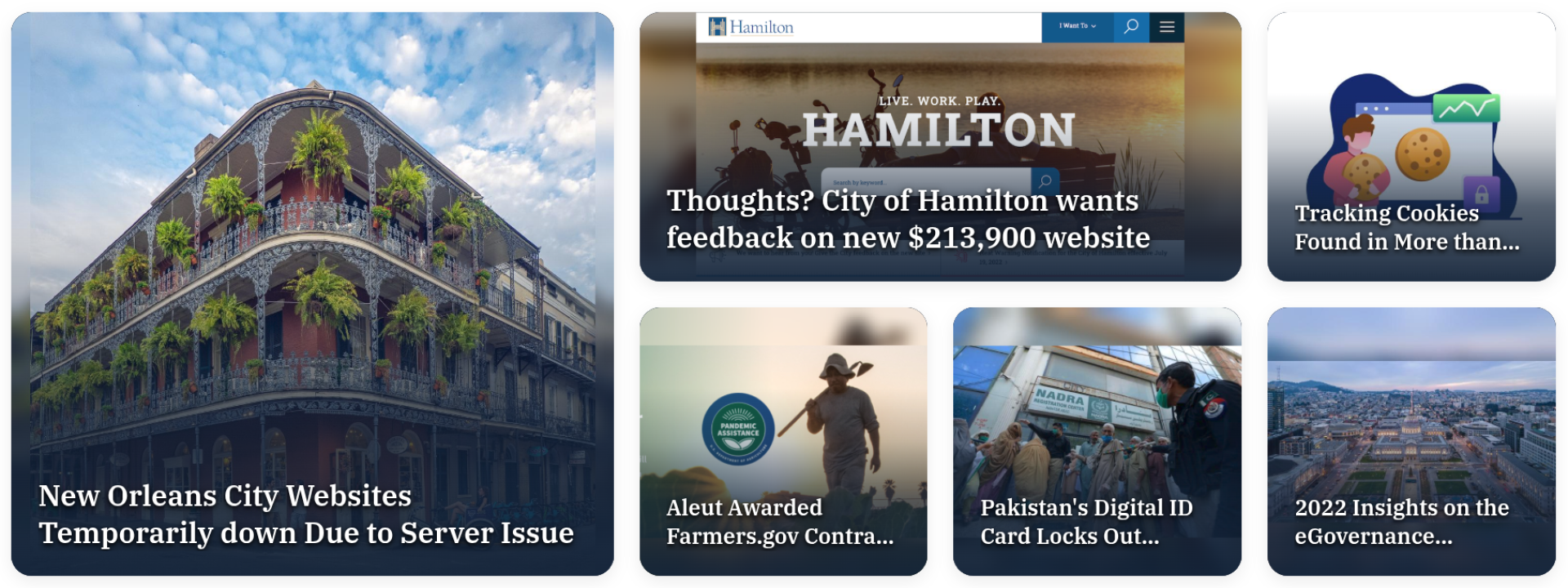
One public example can be seen on eGovReview's news page. In the screenshot accompanying this feature, a New Orleans city website story occupies the dominant position, a City of Hamilton website story takes a wide secondary card, and four other public-sector technology stories fill smaller positions around them. The example shows how differently proportioned photography, website imagery, illustration, and other media can remain part of one hierarchy without making every story visually equivalent.
Readers can also inspect a separate eGovReview gallery demonstration, where Bento Showcase is configured with its Adaptive layout. Rather than following one fixed composition, Adaptive selects an arrangement according to the number of results and the shapes of their images, allowing the card pattern to change as the returned collection changes. The gallery is one accessible implementation of the formatter rather than the limit of what can be built with it.
An art gallery makes that possibility particularly clear because the images themselves can become the principal content. One work could take the dominant position while portrait, landscape, and smaller pieces occupy shapes suited to their proportions, allowing the collection to provide much of the page composition. Portfolios, conference fronts, product ranges, institutional landing pages, and visually led resource collections present related possibilities without requiring separate sector-specific features from the module.
Filter tabs extend the same model across subsets of a collection. Bento Showcase can derive categories from a View field or taxonomy term and can add a Featured tab for sticky, promoted, or explicitly flagged content. When a tab returns fewer items than its selected layout expects, the module rearranges the results rather than leaving empty positions in the grid.
The module was developed by Zyxware Technologies as a reusable solution to presentation problems encountered during Drupal development. In a technical article about Bento Showcase, the company describes the difficulties that appear when bento-style mock-ups meet real CMS content, including inconsistent image proportions, changing result counts, layout movement, accessibility requirements, and repeated custom development. The contributed module packages responses to those problems into Views layouts, image handling, filtering, and extension points that can be reused across projects.

Vimal Joseph, a developer and maintainer of Bento Showcase, told The DropTimes that the formatter follows the sort order configured in Views by default. He said content can also come from a featured queue, while sticky or promoted items can be moved into the first positions. Vimal had previously described the release candidate as a period for wider community feedback and additional testing before the final release. Version 1.0.0, published on 28 September, completes that transition to the first stable release.
Those controls separate editorial choice from presentation. Bento Showcase determines how prominence looks, while Views sorting and existing content metadata can determine which result receives that prominence. A publisher could use a featured queue to choose a lead story, while another site could rely on promoted content, sticky status, dates, weights, or another ordering rule already available through Views.
Not every View needs unequal visual weight. Search results, directories, dense reference collections, and other displays where items should remain peers may still be better suited to a conventional list or equal grid. Bento-style composition becomes more relevant when a site deliberately needs to establish a lead item, distinguish levels of importance, or allow the collection itself to carry a substantial part of the page design.
The stable release continues to require Drupal 11.2 or later, core Views and Image, and Image Scale and Fill Background 1.1.0 or later. The supplied image styles use Drupal's GD image toolkit, although alternative Drupal image styles can be configured for individual tile shapes. Installation is available through Composer with composer require 'drupal/bento_showcase:^1.0'.
Bento Showcase extends a familiar Drupal mechanism without replacing it. Views still decides what belongs in the collection, while the formatter adds rules for how that collection occupies visual space. With the first stable release now available, Drupal site builders can evaluate that model for production editorial fronts, galleries, portfolios, catalogues, and other structured collections.
Disclosure: Zyxware Technologies developed and supports Bento Showcase. Vimal Joseph, quoted in this article, is part of Zyxware and also serves as Head of Technology at The DropTimes. These relationships are disclosed because they are directly relevant to the subject and sourcing of this feature.
References
-
Bento Showcase for Drupal: Bento Grid Layouts for Views | Zyxware (21 September 2026)
 Allen JasonAllen without organs
Image Attribution Disclaimer: At The Drop Times (TDT), we are committed to properly crediting photographers whose images appear in our content. Many of the images we use come from event organizers, interviewees, or publicly shared galleries under CC BY-SA licenses. However, some images may come from personal collections where metadata is lost, making proper attribution challenging.
Our purpose in using these images is to highlight Drupal, its events, and its contributors—not for commercial gain. If you recognize an image on our platform that is uncredited or incorrectly attributed, we encourage you to reach out to us at #thedroptimes channel on Drupal Slack.
We value the work of visual storytellers and appreciate your help in ensuring fair attribution. Thank you for supporting open-source collaboration!

ASK: Drupal Community Needs Your Support
View all →
Disclosure: This content is produced with the assistance of AI.
Note: The vision of this web portal is to help promote news and stories around the Drupal community and promote and celebrate the people and organizations in the community. We strive to create and distribute our content based on these content policy. If you see any omission/variation on this please reach out to us at #thedroptimes channel on Drupal Slack and we will try to address the issue as best we can.

Related Organizations

Related People


You may also like