



How Drupal's Context Control Center Feeds Brand Voice and Site Rules to AI Agents

The contributed Context Control Center module gives a Drupal site one governed place for the rules its AI tools should follow: brand voice, editorial standards and compliance requirements. Each rule is stored as a moderated content item, and when an AI agent or another connected AI tool runs, the module adds only the rules that match the task, the page and the user.1
Its first release candidate, 1.0.0-rc1, came out on 25 September 2026. In an August 2026 interview with The DropTimes, co-maintainer Kristen Pol described the module as a way to give site builders governed, reusable context instead of rules scattered across individual agent prompts.
Published context items can become instructions for configured AI tools, so the roles that can create and publish them influence how those tools behave. Decide who writes rules and who approves them before adding any.
Publishing and Review
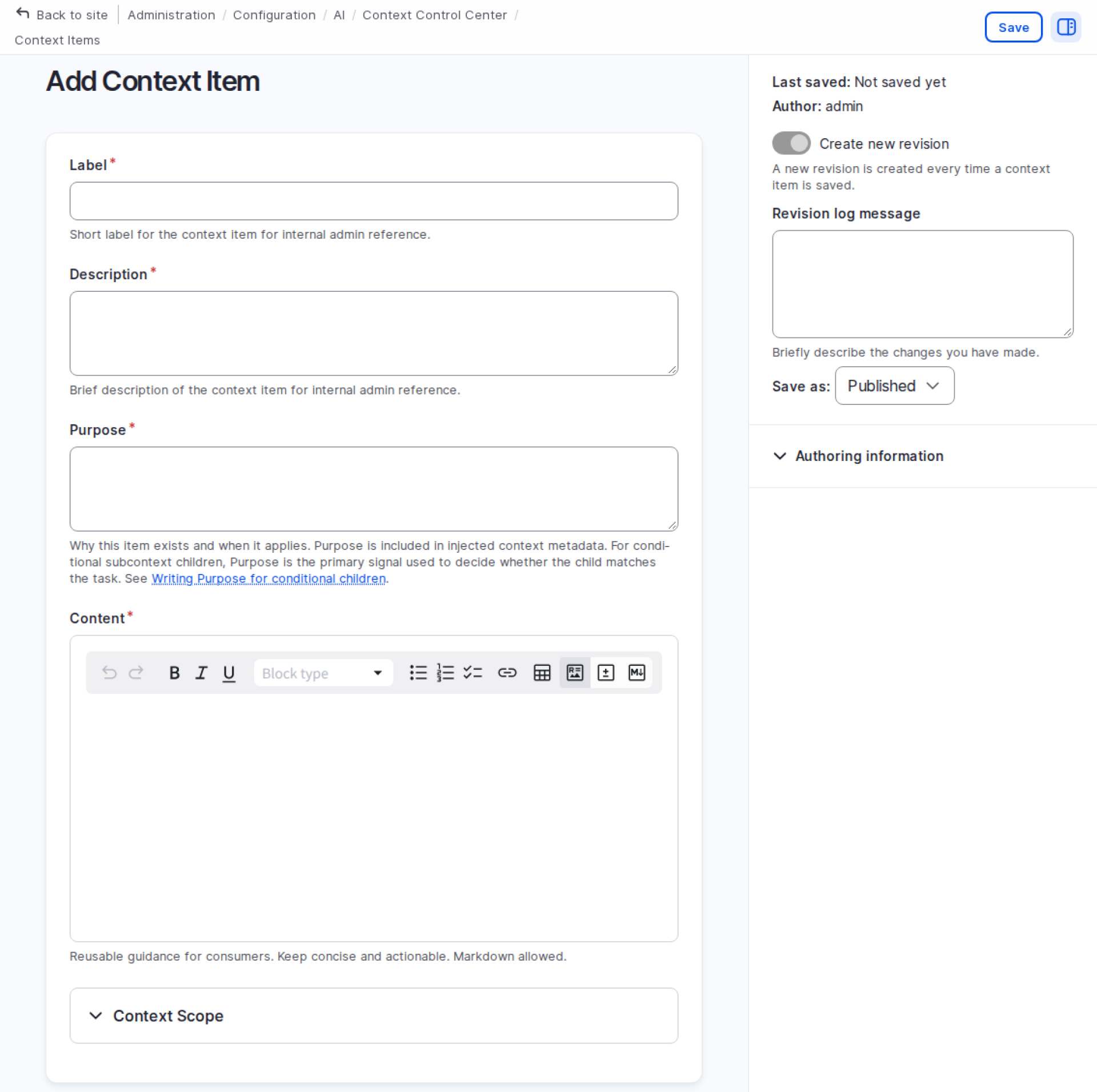
Context items live under Configuration › AI › Tools & Automation › Context Control Center. Each one has a Content body in Markdown that holds the rules, a Purpose field that says what the guidance is for and when it applies, and scope settings that say where it applies.
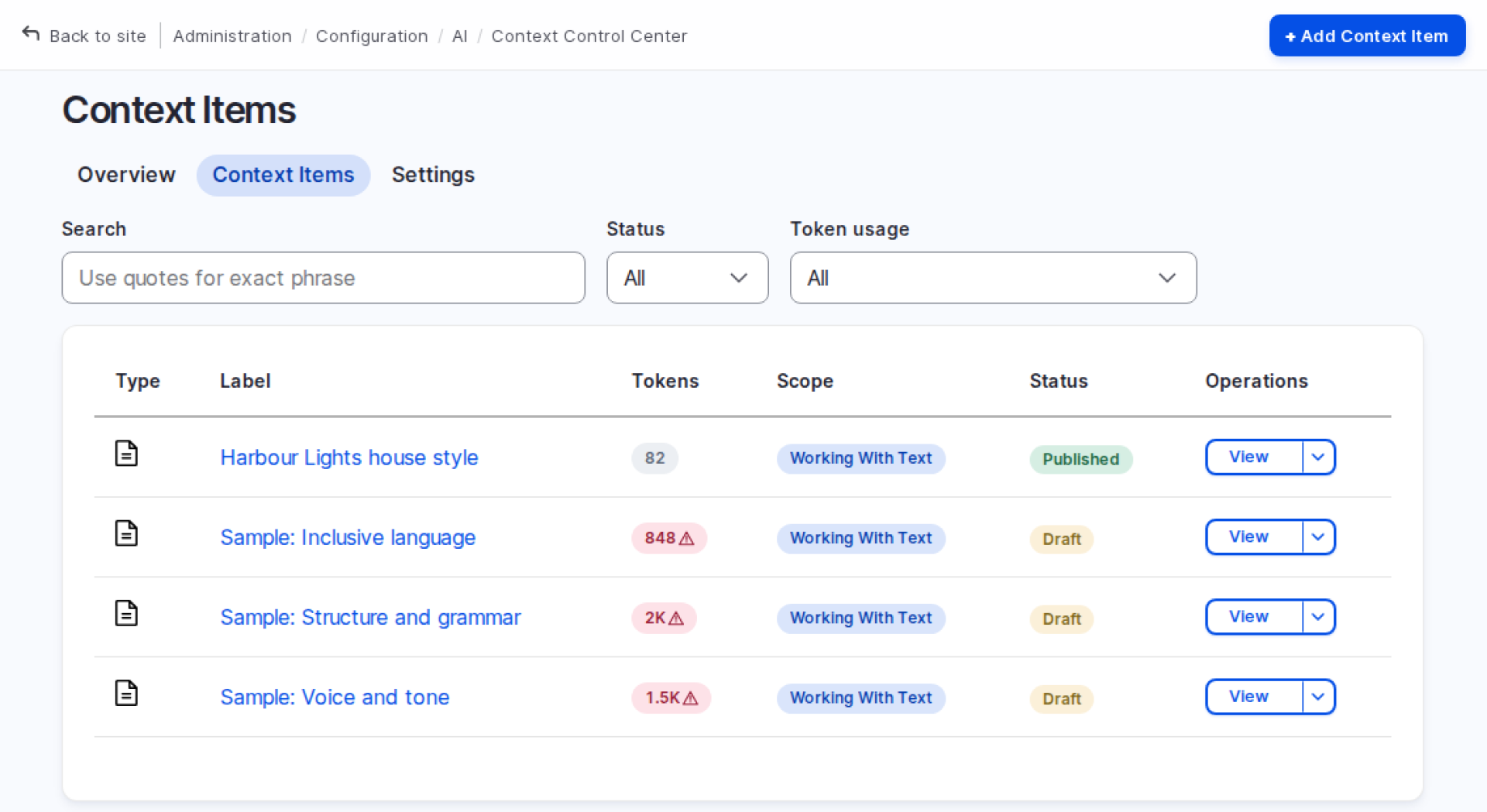
Items move through the module's own moderation workflow, AI Context editorial, with Draft, Published and Archived states, so installing it leaves moderation on other content unchanged. Only published items reach AI tools. The item form preselects Published for new items, so a site that wants every rule reviewed before it goes live should turn off Publish by default in the module's settings.
The module includes an optional recipe, University sample context, which is not applied on installation and must be run separately. It adds unpublished samples for voice and tone, structure and grammar, and inclusive language. The recipe asks sites to copy and adapt them rather than publish the originals.
Who Writes Rules and Who Receives Them
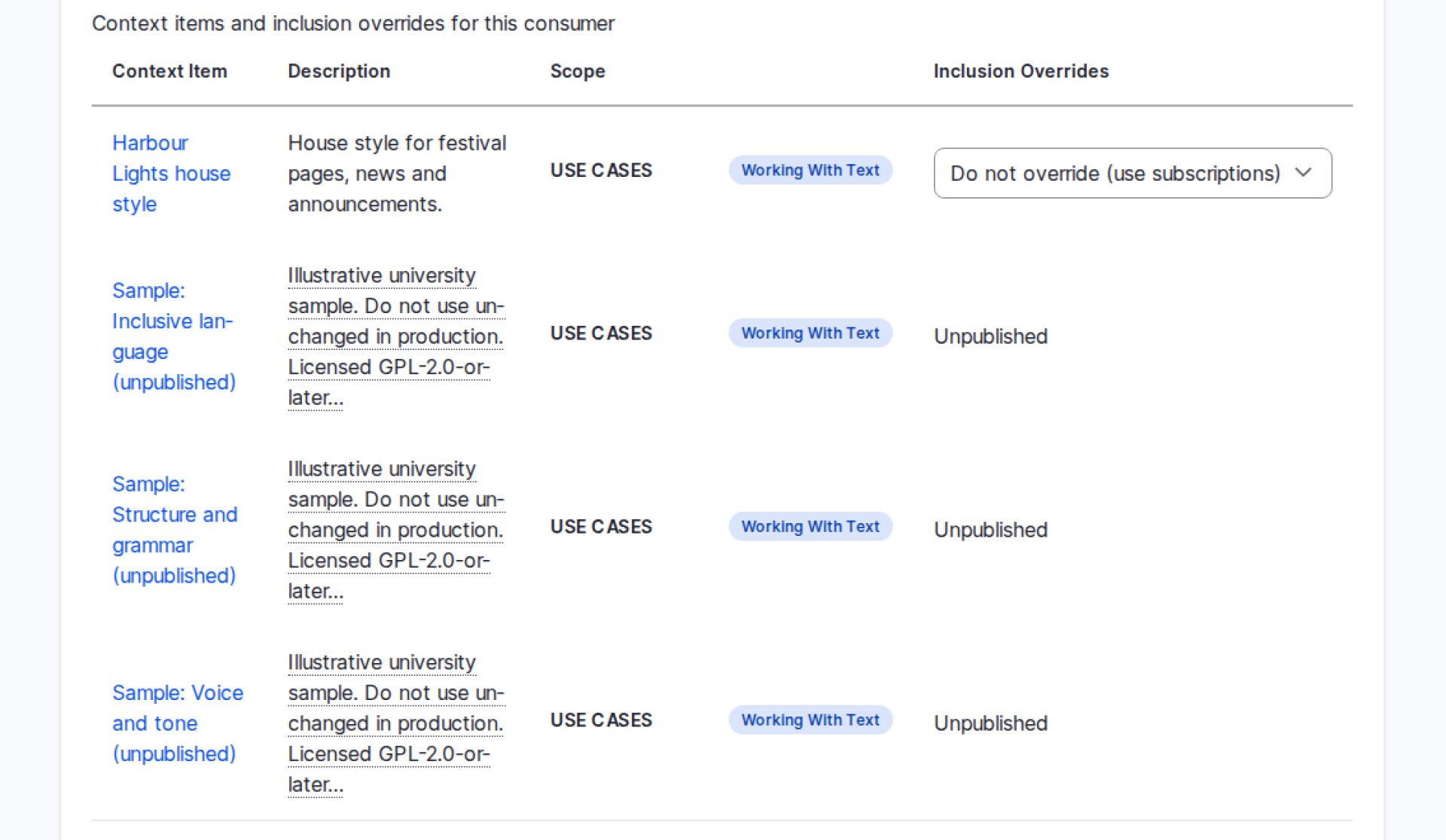
The permissions to create, edit and administer context items are marked as restricted. They are separate from Use Published AI Context in AI Features, which a role needs to receive context. After installation only administrators have it, so AI tools used by editors get no context until a site grants it. The maintainers advise giving authoring rights only to roles trusted to shape AI behaviour on the site.
Targeting Rules with Scopes
Scopes let an editor say where an item applies, and let each AI tool describe what it is working on when it asks for context. A scope works in one or more of three ways:
- Filter: removes items that do not match the current request.
- Match: brings in items that fit the current request, even when the tool has not asked for that scope.
- Subscription: a tool opts in to the scope, and items are scored against it.
| Scope | What it targets | How it works |
|---|---|---|
| Global | Every AI tool | Included for every tool up to the global item limit; clears the item's other scope restrictions |
| Use Cases | Task categories: Working with Canvas, Media, People or Text | Subscription, weighted highest |
| Context Tags | Terms in the AI Context Tags vocabulary | Subscription |
| Roles | Users with at least one selected role | Filter only; never brings an item in by itself |
| Languages | The detected content language | Filter and match |
| Site Sections | URL sections or path patterns with * wildcards | Filter, match and subscription |
| Entity Types | Content types and other entity bundles | Filter, match and subscription |
| Taxonomy Terms | Terms referenced by the content being worked on | Filter, match and subscription |
| Specific Entities | Individual pieces of content (needs the Dynamic Entity Reference module) | Filter; an exact match is always included |
Site builders can switch off scopes they do not need, and developers can add their own scopes or react to selection events.
How Context Is Selected
Context reaches an AI tool in two ways: the module adds it to the tool's prompt automatically, or an agent fetches it on demand through the module's function-call tools. Automatic delivery is on for AI agents. AI Automators can receive context too, and so can the writing tools of the separate AI CKEditor project from its 1.5.0 beta releases, but for these an administrator must switch it on tool by tool.
Each AI tool has its own context settings page. There an administrator chooses the tool's scope subscriptions and can set Always include or Never include for any published item.
Automatic selection follows fixed rules rather than an AI model; only the conditional child items described below involve one. For each request, the module:
- Drops unpublished items, items the user cannot view, and items on the tool's Never include list, which overrides Always include.
- Adds the tool's Always include items, which skip the filters.
- Applies the filter scopes to everything else.
- Takes the Global items and any exact matches on Specific Entities.
- Scores the remaining items against the tool's subscriptions, with Use Cases counting double.
- Lets the selection mode decide which further items join.
- Adds child items, described below, and trims the result to the token limit.
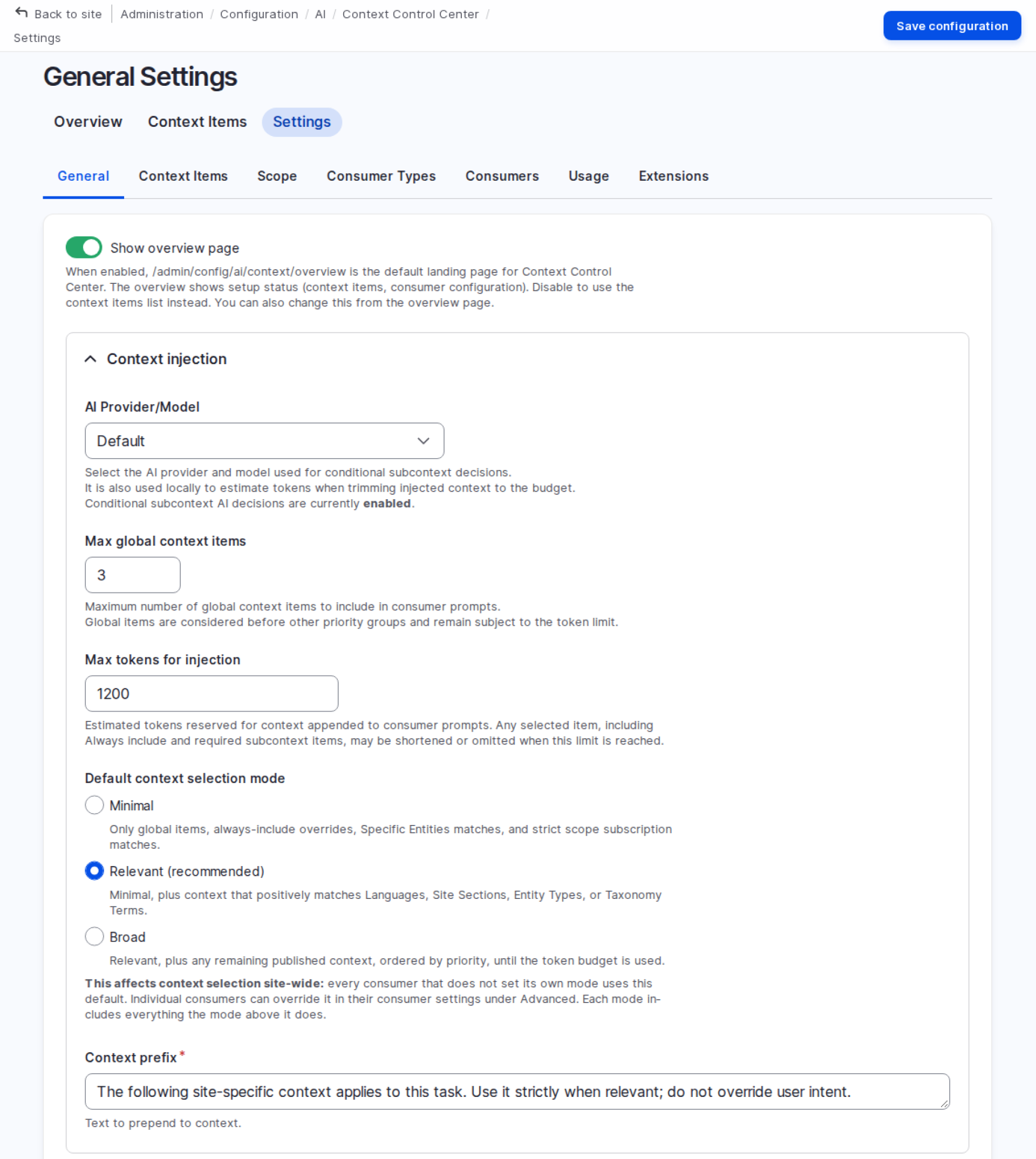
The selection mode, set site-wide and adjustable for each tool, decides how far step 6 reaches. The modes build on each other:
- Minimal: Global items, Always include items, exact matches and items that score on the tool's subscriptions.
- Relevant (the default): adds items that match the request's language, site section, entity type or taxonomy terms, even without a subscription.
- Broad: adds any remaining published item that passes the filters, in Priority order, to fill the leftover budget.
By default the limits are three Global items and 1,200 tokens.2 The module will not publish another Global item until one is unpublished or the limit is raised.
The token budget is tight for detailed guidance: the module estimates the sample rules at about 850 to 2,000 tokens each, so sites with long style guides should raise the limit or split rules into shorter items. When items tie, the higher Priority wins, then the shorter item, so more rules fit.
Subcontext for Special Cases
A parent item, such as a brand voice guide, can hold child items for situations like crisis announcements or faculty profiles. The module calls this subcontext; children cannot have children of their own.
A required child comes with its parent whenever the parent is selected, although the token limit can still shorten or drop it. A conditional child is picked by AI: the module sends each child's Purpose, a snippet of the parent and the current task to the site's AI provider, which chooses the children that apply. If no provider is set up or the call fails, conditional children are skipped and required ones stay. When context is added to an agent, the task sent for this choice is the agent's own instructions rather than the user's question, so conditional children suit agents with a specific job.
Multilingual Sites
A request receives a rule's published translation for its language, or the original when no translation exists, and unpublished rule text is not added to the prompt. In the release candidate, however, an unpublished translation, whether a draft or an archived one, can keep the rule out of requests in that language instead of falling back to the original.3
Usage Tracking
Usage tracking is off by default. When it is on, it records which items each AI tool used, on which route and in which agent run, the tools the run called, and the entities it created or changed. Old records are purged on cron by age and count.
Maintainers and Supporters
Kurt Foster, Chief Technology Officer at Salsa Digital, created the project on Drupal.org in September 2025. Its maintainers are Kristen Pol of Salsa Digital, Aidan Foster of Foster Interactive, Ahmad Khalil of ImageX and Emma Horrell of the University of Edinburgh.4
Salsa Digital leads the project. Foster Interactive and the University of Edinburgh contribute UX, UI and feature input, and ImageX exploratory work on Tool API and MCP. Salsa Digital is a Founding Partner of the Drupal AI Initiative, and Foster Interactive and ImageX are Silver Partners.5
Emma Horrell and James Abrahams presented the module at DrupalCon Rotterdam 2026 on 30 September 2026.6
Requirements and Security Coverage
The project has opted in to Drupal security advisory coverage, which, under the security advisory policy, starts with a stable release. The release candidate is not covered until 1.0.0 is released.
The module needs Drupal 10.5 or later, or Drupal 11.2 or later, the AI module and AI Agents. On Drupal Canvas sites it needs Canvas 1.8.0 or later, because earlier Canvas releases can reject long context items on save.7
Before You Install
- Roles: limit who can create, edit and publish context items, and grant Use Published AI Context in AI Features to the roles whose AI tools should receive them.
- Automators and CKEditor tools: switch on automatic context delivery for each one that should follow the rules.
- Publish by default: turn it off if every rule should be reviewed before it reaches AI tools.
- Multilingual sites: after archiving or drafting a translation, check that the rule still reaches requests in that language.
- Stable release: check whether 1.0.0 has shipped and security coverage has begun.
- Canvas sites: run Canvas 1.8.0 or later.
Issues and documentation are in the project's GitLab repository.
Footnotes
- 1Kristen Pol, Context Control Center: Teaching Drupal AI Your House Rules, Drupal AI Learners Club session, Drupal.org, 11 September 2026. drupal.org/docs/develop/development-tools/ai-coding-tools-for…
- 2Context Control Center code at the 1.0.0-rc1 tag: default settings, the item form's Publish by default option, the Global limit check on save, permissions, translation handling and the task sent for agents' conditional children (read 12 November 2026). git.drupalcode.org/project/ai_context/-/tree/1.0.0-rc1
- 3Local tests by The DropTimes: Context Control Center 1.0.0-rc1 on a Drupal CMS test site with AI 1.5.0 and AI Agents 1.3.5, 12 November 2026 (selection, translations on a two-language site, usage tracking and conditional children with OpenAI's gpt-4o-mini model; screenshots).
- 4Drupal.org: creator, Context Control Center project page, maintainers and supporting organisations (read 12 November 2026). drupal.org/project/ai_context
- 5Drupal.org, Drupal AI partners (read 12 November 2026). new.drupal.org/ai/partners
- 6DrupalCon Rotterdam 2026 session by Emma Horrell and James Abrahams, Context Control Center: Bringing AI Context Natively to Drupal CMS, 30 September 2026. events.drupal.org/rotterdam2026/session/context-control-cente…
- 7Drupal Canvas issue tracker, Work item #3575644 (cited in the Context Control Center README; closed 3 July 2026). git.drupalcode.org/project/canvas/-/work_items/3575644
References
-
-
Context Control Center (CCC) | Drupal.org, Drupal.org
-
Configuration - Context Control Center (ai_context) for Drupal, Context Control Center
-
Context Selection - Context Control Center (ai_context) for Drupal, Context Control Center
 Vimal JosephVimal leads the technical transformation of The Drop Times
Image Attribution Disclaimer: At The Drop Times (TDT), we are committed to properly crediting photographers whose images appear in our content. Many of the images we use come from event organizers, interviewees, or publicly shared galleries under CC BY-SA licenses. However, some images may come from personal collections where metadata is lost, making proper attribution challenging.
Our purpose in using these images is to highlight Drupal, its events, and its contributors—not for commercial gain. If you recognize an image on our platform that is uncredited or incorrectly attributed, we encourage you to reach out to us at #thedroptimes channel on Drupal Slack.
We value the work of visual storytellers and appreciate your help in ensuring fair attribution. Thank you for supporting open-source collaboration!

ASK: Drupal Community Needs Your Support
View all →
Disclosure: This content is produced with the assistance of AI.
Note: The vision of this web portal is to help promote news and stories around the Drupal community and promote and celebrate the people and organizations in the community. We strive to create and distribute our content based on these content policy. If you see any omission/variation on this please reach out to us at #thedroptimes channel on Drupal Slack and we will try to address the issue as best we can.

Related Drupal Initiatives

Related Organizations



Related People


You may also like