



How to Connect an AI Assistant to Drupal Through a User's Own Account

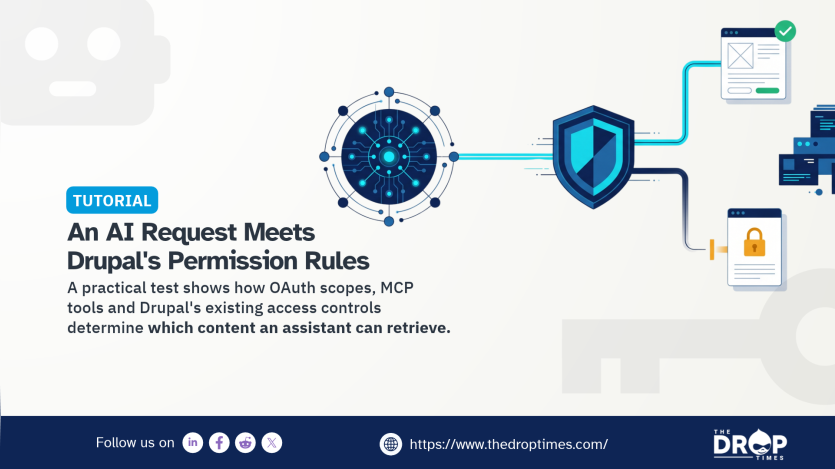
The Agent Access recipe connects an outside AI assistant to Drupal through a user's existing account. Its project page states that people "should connect with their own Drupal account, and Drupal's existing permissions for that user should always apply". Connected through a non-administrator account, the assistant gets only what both that account and the connection's approved scopes allow.
On The DropTimes' test site, Google Antigravity's command-line agent, agy, signed in as a non-administrator account, listed only the published article and was refused the unpublished page. Drupal logged each call against that account. The DropTimes tested the setup below on a local site on 21 November 2026. Because Agent Access and most of its dependencies are alpha or beta releases, its README asks evaluators to use "a non-production site with a limited test account and non-sensitive data".1
How the Pieces Fit Together
Scott Falconer maintains Agent Access, supported by Acquia, to connect Drupal to AI tools such as ChatGPT.com, Claude Cowork and OpenClaw. The recipe installs and configures three projects:
- MCP Server gives the site an endpoint the assistant can talk to. The Model Context Protocol (MCP) is an open protocol that lets an assistant discover and call the tools another system offers.2 The maintainers of MCP Server include Mateu Aguiló Bosch (e0ipso) and Matt Glaman (mglaman), supported by Lullabot, Omedia and Acquia.
- Tool API defines the operations the assistant can call. Tool API describes each operation once, with typed inputs, typed outputs and an access check. In a blog post on 15 September 2026, Matt wrote that Tool API lets a developer declare an operation once and "then invoke it from Drush, from MCP, from ECA, or from a controller." Michael Lander (michaellander) created Tool API, with EPAM, Pantheon and Acquia as supporting organisations.3
- OAuth decides who is calling. Simple OAuth, also co-maintained by Mateu, issues tokens tied to a Drupal user after the user approves the connection.
What You Will Build
You will connect a Drupal site to an AI assistant over MCP so that:
- the site exposes an MCP endpoint at
/mcp - an assistant signs in through OAuth as a test account you choose
- the assistant receives two read-only content tools and can answer questions about the content that account may see
The recipe ships no write tools.
Versions Tested
The steps were tested with these versions:
| Package | Version tested | Release stage | Security advisory coverage |
|---|---|---|---|
| Drupal core | 11.4.13 | Stable | Yes |
| Agent Access (recipe) | 1.0.0-alpha8 | Alpha | No |
| Tool API | 1.0.0-beta12 | Beta | No |
| Tool Belt | 1.0.0-alpha7 | Alpha | No |
| MCP Server | 2.0.0-beta7 | Beta | No |
| MCP Server Tool Bridge | 1.0.0-beta5 | Beta | No |
| MCP Server OAuth | 1.0.0-alpha2 | Alpha | No |
| Simple OAuth | 6.1.4 | Stable | Yes |
| Consumers | 8.x-1.24 | Stable | Yes |
| Simple OAuth 2.1 | 1.13.11 | Hosted on GitHub | Not a Drupal.org project |
The recipe requires Drupal 11.4.13 or later and Simple OAuth 6.1.4 or later; both are security releases, and Simple OAuth's update fixes the critical access bypass in SA-CONTRIB-2026-296.
Before You Start
You need:
- a Drupal site created from
drupal/recommended-projectmeeting the minimum versions above - Composer 2 and Drush 13
- a non-administrator user account to test with, plus one published node and one unpublished node that account cannot view
- an HTTPS address for the site: DDEV provides one locally, while a hosted assistant needs a public URL
- an AI assistant that supports remote MCP servers with OAuth sign-in
The DropTimes ran these steps on DDEV with PHP 8.3, MariaDB and Google Antigravity's command-line agent, agy 1.5.6. Without DDEV, omit the ddev prefix and run commands from the project root.
Step 1: Install the Packages
Install the recipe and its dependencies. Because Composer ignores stability flags on transitive dependencies, every pre-release package is listed explicitly:
ddev composer require \
  'drupal/simple_oauth:^6.1.4' \
  'drupal/tool:^1.0.0-beta12@beta' \
  'drupal/tool_belt:^1.0.0-alpha7@alpha' \
  'drupal/mcp_server:^2.0.0-beta7@beta' \
  'drupal/mcp_server_tool_bridge:^1.0.0-beta5@beta' \
  'drupal/mcp_server_oauth:^1.0.0-alpha2@alpha' \
  'drupal/agent_access:^1.0.0-alpha8@alpha'
Composer places the recipe in recipes/agent_access.
Step 2: Apply the Recipe
Apply the recipe with Drupal's dr CLI, passing your site's HTTPS address with --url. If dr is unavailable, run ddev drush recipe ../recipes/agent_access.
ddev exec vendor/bin/dr recipe ../recipes/agent_access --url=https://your-site.example
On the test site, the recipe installed 13 modules and finished with "Agent Access for Drupal applied successfully". If Drupal reports that a newly downloaded extension "is not a known module or theme", rebuild the cache with ddev drush cache:rebuild and run the recipe command again.
The recipe adds two OAuth scopes, each mapped to a Drupal permission, and creates no roles or user accounts:
| Scope | Drupal permission |
|---|---|
drupal:mcp:connect | access mcp server |
drupal:content:read | access content |
Step 3: Generate the Token-Signing Keys
Simple OAuth signs tokens with an RSA key pair stored outside the web root. With a web/ docroot inside DDEV, put the keys in /var/www/html/oauth-keys:
ddev exec mkdir -p /var/www/html/oauth-keys
ddev drush simple-oauth:generate-keys /var/www/html/oauth-keys
ddev drush config:set simple_oauth.settings public_key /var/www/html/oauth-keys/public.key -y
ddev drush config:set simple_oauth.settings private_key /var/www/html/oauth-keys/private.key -y
You can also generate keys in the browser at /admin/config/people/simple_oauth.
Step 4: Check and Fix the Registration Endpoint
Passing --url in Step 2 saved the site's /oauth/register address directly on the test site. If --url is omitted, applying the recipe from the command line can save http://localhost/oauth/register as the dynamic client registration URL, tracked in Simple OAuth 2.1 issue #21. Check the saved setting:
ddev drush config:get simple_oauth_server_metadata.settings registration_endpoint
If it returns http://localhost/oauth/register, or to let Drupal derive the URL from each request, delete the stored value and rebuild caches:
ddev drush config:delete simple_oauth_server_metadata.settings registration_endpoint -y
ddev drush cache:rebuild
Confirm at /.well-known/oauth-authorization-server that registration_endpoint now uses your site's domain.
Step 5: Create a Limited Test Account
Create a role with the two connection permissions and assign it to your test account, editor1 below. Do not grant these permissions to all authenticated users.
ddev drush role:create agent_tester 'Agent tester'
ddev drush role:perm:add agent_tester 'grant simple_oauth codes,access mcp server'
ddev drush user:role:add agent_tester editor1
grant simple_oauth codes lets the user approve a client on the consent screen, and access mcp server allows requests to /mcp.
With a user-bound OAuth token, Simple OAuth narrows the session to the intersection of the account's roles and the permissions mapped to the token's approved scopes (access mcp server and access content), plus Drupal's per-entity access checks. Both starter tools require both scopes, so a token missing either one cannot call them. Extra browser permissions, such as viewing unpublished content, and administrator roles are excluded over MCP. Only user 1 keeps full access while Drupal's super user access policy is switched on.
Step 6: Test the Account's Limits from Drush
Tool Belt's content submodule provides 15 tools, listed by ddev drush tool:list, though only two are exposed over MCP. Check your test account's user ID with ddev drush user:information editor1, then test tool_belt:entity_list as that user:
ddev drush tool:run tool_belt:entity_list --uid=2 \
  --input='{"entity_type_id":"node","amount":5,"fields":["title","status"]}'
On the test site, the command returned only the published article:
Success: Returned 1 Content(node) entities out of a total 2 (1 entities denied access)
Run as --uid=1, the same command returned both nodes. Drush runs with the account's full permissions; the scope narrowing in Step 5 applies only to MCP requests, so an account with extra permissions can see more here than the assistant will. You can inspect any tool's input schema and constraints with ddev drush tool:info <tool_id>.
Step 7: Connect the Assistant
Any assistant with remote OAuth MCP support connects through /mcp. It registers itself with Drupal, then opens a browser for you to sign in and approve access. The DropTimes tested with agy against a local HTTPS address.
Add the site as an MCP server:
agy mcp add drupal https://your-site.example/mcp
Then sign in:
- Start
agy, type/mcp, selectdrupaland choose Authenticate. - Sign in to Drupal in the browser as the test account.
- On Grant Access to Client, review the two requested permissions ("Connect to the site MCP endpoint" and "Read Drupal content the account may view") for "Google Antigravity" and click Allow.
- Paste the one-time code shown on
antigravity.googleback intoagy.
In testing, agy registered itself on first start and received a token with both scopes. Because the sign-in code appears on antigravity.google, it passes through that page rather than staying on the local machine.
If an assistant asks which scopes to request, supply drupal:mcp:connect drupal:content:read. If it cannot register itself, create the OAuth client manually at /admin/config/services/consumer.
Step 8: Confirm the Access Boundaries
Confirm that /mcp rejects unauthenticated requests. Without a bearer token, it returns 401 Unauthorized with a Www-Authenticate: Bearer realm="mcp_server" header pointing to /.well-known/oauth-protected-resource/mcp:
curl -i -X POST https://your-site.example/mcp
With the token, the server identifies itself as "Drupal MCP Server" and exposes two tools:
tool_api__entity_list      List entities
tool_api__entity_metadata  Get entity metadata
Ask the assistant to list your content and fetch metadata for both nodes. For a one-shot agy -p run, pass a session-only allow rule because one-shot mode cannot prompt for tool approval:
agy --settings '{"permissions":{"allow":["mcp(drupal)","mcp(drupal/*)"]}}' \
  -p "Using the drupal MCP server, list the content you can see, then get metadata for nodes 1 and 2."
Signed in as editor1, agy got these results:
- List entities: returned the published article only, with
1 entities denied access. - Get entity metadata for the published article: returned its entity type, bundle, language, revisionability and translatability.
- Get entity metadata for the unpublished page: returned
Access denied for tool tool_belt:entity_metadata.
What You Can Ask It
The DropTimes repeated the test on a sample library site with eight published items and four drafts, asking agy everyday questions.
- "List the 10 most recent articles, with each one's author and whether it is published." As
editor1,agyreturned a table of the seven published articles, newest first, with their authors. - "What content is on this site, including any drafts?" It listed the eight published items and reported that four unpublished items exist but were refused, because the list tool counts entities before access filtering.
- "Show me my own draft articles." Signed in as an author who can open her own draft in Drupal,
agyanswered that she had no accessible drafts.
Asked for an unpublished page, agy suggested granting permission to view unpublished content, which has no effect over MCP because the recipe's scopes omit it. On open-ended prompts, agy also queried taxonomy terms, custom blocks, menu links and URL aliases, all within the account's access. In a scripted check on the same site, an administrator-role account also saw only the eight published items, while user 1 saw all 12.
What Drupal Logs
Each tool call over MCP is logged under mcp_server at /admin/reports/dblog against the authenticated user's ID. On the test site, log messages included "Handling request" with the request method, "Executing tool" with the tool name, and the response status. Tool arguments stay out of the log, a change MCP Server's release notes describe as "Keep tool payloads out of the log".4
[IMAGE: images/lab-dblog-mcp-session.png | Alt: Drupal's Recent log messages page filtered to mcp_server. Each entry, such as "User is: anna.writer", "Executing tool name="tool_api__entity_metadata"" and "Response status: 200", lists anna.writer in the User column | Caption: Each step of an assistant's session is recorded against the signed-in account. Local test. Screenshot: The DropTimes ]
Disconnecting an Assistant
The Agent Access connection guide advises against relying on /oauth/revoke in this release and instead disconnecting an assistant manually:
- To cut access immediately, block the Drupal user account first.
- Delete the client's 300-second access token and its 14-day refresh token at
/admin/config/people/simple_oauth/oauth2_token. - If the client was created for that connection alone, delete it at
/admin/config/services/consumer. - Remove the server from the assistant, using
agy mcp removeinagy.
In testing, deleting the token records caused subsequent MCP requests with the old token to fail with 401 Unauthorized.
Troubleshooting
- Registration still points to
localhost: repeat Step 4 and verify/.well-known/oauth-authorization-server. - Schema error on tool call: inspect input types with
ddev drush tool:info <tool_id>; pass entity IDs as strings, such as"1", not JSON numbers. - Drush returns fewer items than expected: pass
--uid;tool:rundefaults to the anonymous user. - No browser window opens when connecting: verify that the assistant supports remote OAuth MCP servers and can reach your site over HTTPS.
agy -pdoes not use the Drupal tools: pass the session-only allow rule from Step 8; one-shot mode denies unapproved tools.401 Unauthorizedon/mcp: check the OAuth key paths and the endpoint URL. A deleted token also returns401; reconnect to get a new one.403 Forbiddenversus tool access errors:/mcpreturns HTTP403when the token lacks either of the recipe's scopes or the account lacksaccess mcp server. Withoutdrupal:mcp:connect, or without that permission, the connection itself is refused. Withoutdrupal:content:read, the connection opens and lists both tools, but every tool call is refused with aninsufficient_scopechallenge that names both scopes; reconnect and approve both. A per-entity denial, such as the unpublished page in Step 8, gets an HTTP200JSON-RPC response that beginsAccess denied for tool <tool ID>.
Current Limits
Agent Access's security notes list these limits:
- Evaluation-only posture: shared-site and multi-account deployments are "not yet a supported security posture".
- Optional Proof Key for Code Exchange (PKCE) on dynamically registered clients: PKCE is not mandatory on dynamically registered clients; to require PKCE and disable remembered approvals, create the OAuth consumer manually.
- Aggregate counts and reference IDs:
tool_belt:entity_listchecks access before returning referenced-entity labels, but it still reports total counts before access filtering, such asReturned 1 User(user) entities out of a total 3 (2 entities denied access)when run aseditor1, and returns reference IDs that can disclose information about content the account cannot view.
Report recipe bugs in the Agent Access issue queue, and report security-relevant defects privately to the maintainer through Drupal.org.
Before exposing any additional tool, read the Agent Access security notes: adding a tool "does not certify that tool's access behavior", and the README advises against enabling tool_belt:entity_field_values or tool_belt:entity_load_by_id in this release.
The DropTimes was a media sponsor of DrupalCon Rotterdam 2026, where Acquia and Pantheon were also sponsors.
Footnotes
- 1Agent Access README, CONNECTING.md and SECURITY.md, tag 1.0.0-alpha8. git.drupalcode.org/project/agent_access/-/tree/1.0.0-alpha8
- 2The DropTimes, How MCP Turns Your Drupal Site Into an AI-Ready Platform. thedroptimes.com/66132
- 3Tool API project page, Drupal.org (creator michaellander; supporting organisations EPAM, Pantheon, Acquia; 1.0.0-beta12 released 20 October 2026). drupal.org/project/tool
- 4MCP Server project page, Drupal.org, 2.0.0-beta6 release notes (14 October 2026), 2.0.0-beta7 release (29 October 2026) and work item #3585937. drupal.org/project/mcp_serverdrupal.org/project/mcp_server/releases/2.0.0-beta6drupal.org/project/mcp_server/releases/2.0.0-beta7git.drupalcode.org/project/mcp_server/-/work_items/3585937
 Vimal JosephVimal leads the technical transformation of The Drop Times
ASK: Drupal Community Needs Your Support
View all →
Disclosure: This content is produced with the assistance of AI.
Note: The vision of this web portal is to help promote news and stories around the Drupal community and promote and celebrate the people and organizations in the community. We strive to create and distribute our content based on these content policy. If you see any omission/variation on this please reach out to us at #thedroptimes channel on Drupal Slack and we will try to address the issue as best we can.

Related Drupal Initiatives

Related People


You may also like